

Work

Synthetic data

doc2data: invoices and receipts to checked data

A folder of invoice and receipt PDFs or scans goes in. One clean Excel, CSV or JSON file comes out, with a list of everything that needs a human look.

App recording with synthetic data. No audio.

Starting point

Invoices and receipts arrive as PDFs or scans and are retyped by hand into spreadsheets.

The challenge

Extract the fields without guessing: every uncertain value has to land on a review list, not in the final spreadsheet.

What we built

What it extracts

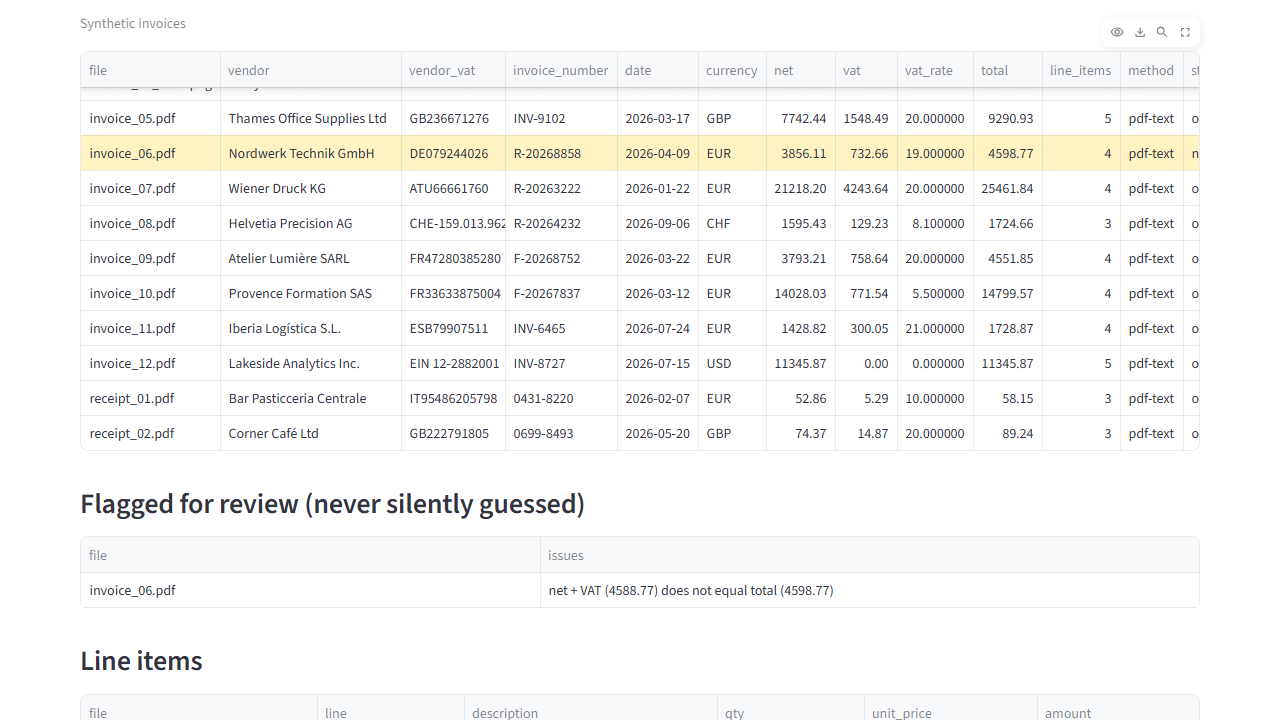
Vendor, VAT number, invoice number, date, currency, net amount, VAT, total, and every line item.

How it checks

  • Net + VAT must equal the total; line items must add up
  • Dates must be plausible; VAT numbers must have a valid format
  • Anything that fails a check is flagged for review, never guessed

How it runs

  • Offline, on your own computer, with no cloud service
  • Text PDFs are read directly; scans go through OCR (optical character recognition) on your machine, with no cloud service
  • An AI fallback for unusual layouts is optional and off by default. It asks only for fields the rules missed, and those fields are always flagged. The AI fallback is off by default. If you switch on the cloud option, it sends up to the first 6,000 characters of the extracted text to an OpenAI-compatible provider you choose, using your own API key. The optional Ollama fallback runs on the same machine (localhost); nothing leaves the computer. Both are built and unit-tested, not yet tested against a live model. The demo app offers only the local option; the cloud option exists only in the command-line tool.
Demo screenshot with synthetic data: doc2data (1)
Extracted invoice fields · synthetic data, 5 October 2026.
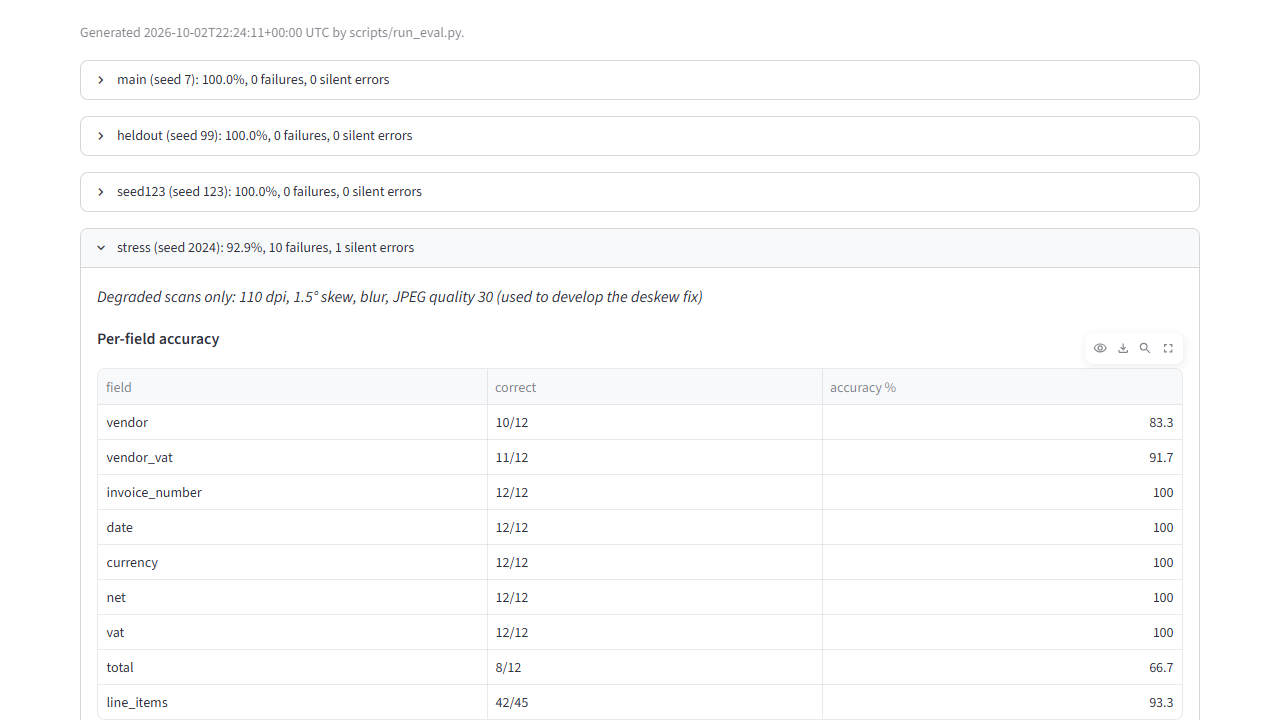
Demo screenshot with synthetic data: doc2data (2)
Results and errors · synthetic data, 5 October 2026.

Results

Measured on 2 October 2026 in our Docker build. All documents are synthetic: invented companies, addresses and VAT numbers.

Test setFields correct
3 clean sets of 16 documents each (invoices in 4 languages and 4 currencies, receipts, clean scans)0 errors in 189, 191 and 178 fields
Degraded scans, used while developing a fix92.9% (131 of 141)
Degraded scans, not looked at while fixing (per the developer's log)91.4% (127 of 139)
  • The invoice with a deliberate arithmetic error was flagged in every set.
  • The automated test suite passes 21 of 21 tests.

Full test evidence: field counts, review flags and limits for all five sets

Synthetic documents. Real accuracy must be measured on your samples. The synthetic invoices use 2 layouts plus a receipt format, and the rules were written knowing them. Real supplier documents will score lower; that is why every project starts by measuring on your own documents.

Full test evidence

Technical background

Python, pdfplumber and pypdfium2 (PDF text), RapidOCR on ONNX Runtime (offline OCR), pandas, openpyxl, Streamlit; synthetic test PDFs generated with ReportLab; tests with pytest; packaged with Docker.

Limits

  • Several VAT rates on one invoice: not handled
  • Line-item tables across several pages: not handled
  • Credit notes: not handled
  • Line descriptions that wrap onto two lines: not handled reliably
  • VAT numbers are checked for format only, not by checksum or against the EU's VIES register
  • Single-character OCR errors in names and VAT numbers on poor scans cannot be caught by arithmetic checks
  • No real-world accuracy has been measured yet

Related work

Synthetic data

FatturaPA reader and SdI receipt explainer

Italian e-invoices (XML and signed .p7m) to one checked spreadsheet, where the implemented checks flag defined problems, with the SdI rejection code where one applies; SdI notices explained in plain words.

Test results and limits

On 3 synthetic sets of 94 invoices: 28 of 28 planted faults detected in each, 0 of 66 clean invoices flagged by mistake (measured 5 October 2026).

Read the project: FatturaPA reader and SdI receipt explainer
Synthetic data

Ask your documents

Questions answered from your own files with the exact sentence and its source, offline, with rules to refuse unsupported questions.

Test results and limits

On the synthetic hold-out set: 36 of 43 correct; 11 of 12 unanswerable questions refused and 1 answered wrongly (measured 5 October 2026).

Read the project: Ask your documents

Bring your workflow into focus.

Send up to 3 samples or describe one process. We reply by email with what is feasible and how we would measure it.

Start a project

Optional AI assistance

The project now includes optional Groq assistance, disabled by default. The original local checks, calculations and source passages remain the basis for results. AI output needs human review.

After administrator setup, explicit consent is required before text is sent to Groq. Explanation tools show a context preview; invoice extraction can send OCR or document text after its consent step. API credentials stay on the server. Owner access, upload limits and a shared request budget protect the local demos.

This static website does not run the assistant or accept document uploads. Earlier demo recordings and measurements cover the original local workflows; the Groq integration has not yet been evaluated with live requests.

SNELLO / TOOLS

This explains the tool; it is not a live AI session. No document is uploaded.

Our working method
Full diagram

Read the project

Discuss your project

Send up to 3 samples or describe one process, the tools you use and the result you need.

snello.contact@gmail.com

Go to the Contact page

Navigation